1
|
s4-notdlg
|
vrijdag 11 juli 2014
How to hide elements in modal dialog in SharePoint 2013
donderdag 25 juli 2013
SharePoint Inventory
People who are busy with SharePoint migrations know that it is useful to first perform an analysis of the content. There are some tools to help you but most of them aren’t free. At this moment I’m busy with creating an inventory of a SharePoint 2007 and I’ve automated it in a console application. The console application can also be used on a SharePoint 2010 version.
My console application “SharePointContentInventory” generates a xml of al the sitecollections, sites, lists and workflows with their properties.
For business users is a xml not readable so I have also written a Windows Forms Application that generates a treeview of the xml. If you click on a treeviewnode the properties are shown in the right pane of the application.
maandag 17 juni 2013
SharePoint 2013: Show title row in searchcenter
http://www.estruyf.be/blog/display-the-title-row-top-navigation-in-the-search-centers-of-sharepoint-2013/
When working with the new search centers in SharePoint 2013, the first thing that you will notice is that the title row is different compared with for example a standard Team Site.
SharePoint 2013 Branding tips
It’s time to take a deep dive into the SharePoint 2013 branding. My research on the internet stopped very quickly on the blog from Eric Overfield. After reading his blog I noticed some important branding tips:
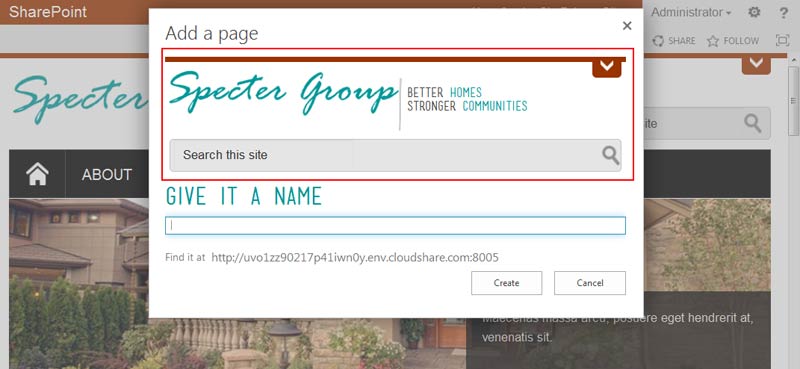
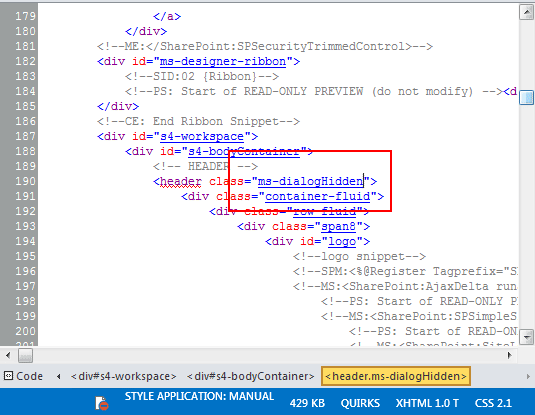
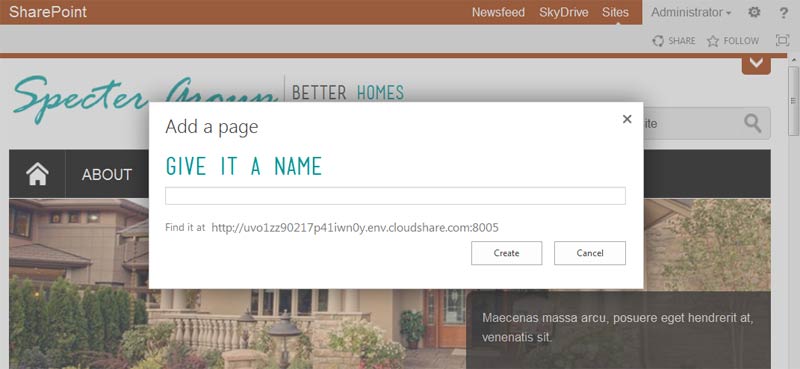
- s4-notdlg from SharePoint 2010 changed to ms-dialogHidden in SharePoint 2013:
In a custom branding project you add a new container element, such as a new header, navigation block or footer to your System (default) Master Page. This element then appears in dialogs even through we do not want it to.
Solution:
SharePoint 2013 template for Photoshop
You can download it here
Enjoy it!
woensdag 24 april 2013
SharePoint 2010 Alerts
If you create new daily alert and want to see whether it will work or not it is not very convenient to wait 24 day until SharePoint will sent them next time. In this post I will show how to trigger summary alerts and send them when you need.
When you add a new daily alert on a list or something a new row is added to the SchedSubscriptions table into the SharePoint content database. The most important columns in this table are NotifyTime and NotifyTimeUNC. In these columns stores SharePoint the time when next time daily alert for particular list will be send.
Step 1: Get the id of the daily alert that you want to modify
SELECT * FROM SchedSubscriptionsStep 2: Copy the Id and execute the following SQL query:
declare @s datetime declare @u datetime set @s = CAST('2013-04-24 10:00:00.000' as datetime) set @u = CAST('2013-04-24 07:00:00.000' as datetime) update dbo.SchedSubscriptions set NotifyTime = @s, NotifyTimeUTC = @u where Id = '. . .'Notice that the NotifyTimeUNC = NotifyTime minus 3 hours.
After that wait some time. Exact time of waiting depends on the Recurring Schedule of the Immediate Alert timerjob.
dinsdag 19 maart 2013
SharePoint 2010: Show lync presence in custom webpart
My customer asked for a contact details webpart with the feature if the contact is available on Lync or not. It isn’t difficult to get the contact details from a user profile in contrast to get the lync presence. I spend a few hours to get how it works in SharePoint 2010 and finally I found this blog post of Martin Kearn. With a little bit of fine tuning I rewrote the function to let it work with the UserProfile property instead of a SPFieldUserValueCollection.
maandag 11 maart 2013
SharePoint 2010 Contact Details WebPart
A customer asked me to write a webpart to have the possibility to show contact details of a user based on the userprofile. Someone told me that this webpart could be useful in other projects too. I reviewed my code an made it generic so it can be used in every SharePoint 2010 where are userprofiles present. It’s also expanded with localization. The webpart is available in English, Dutch and French.
woensdag 6 februari 2013
Add webparts to pages via PowerShell
This week I created some webparts. Those webparts must be added to more than 1000 pages in SharePoint. It’s an awful job to do it manually, so I created a script in PowerShell that do the job for me ![]()
- Add-PSSnapin Microsoft.SharePoint.PowerShell
- Start-SPAssignment -Global # This cmdlet takes care of the disposable objects to prevent memory leaks
- function AddCustomWebPart($web,$page,[string]$webpart_nameSpace,[string]$webpartTitle,[int]$index)
- {
- $comment = $webpartTitle + " WebPart Added"
- $webpartmanager=$web.GetLimitedWebPartManager($page.Url, [System.Web.UI.WebControls.WebParts.PersonalizationScope]::Shared)
- $wpsOnPage = $webpartmanager.WebParts | % { $_ }
- foreach($wp in $wpsOnPage)
- {
- if($wp -ne $null)
- {
- if($wp.Title -eq $webpartTitle)
- {
- Write-Host "webpart " $wp.Title " exists on page. "
- $webpartmanager.DeleteWebPart($webpartmanager.WebParts[$wp.ID]);
- }
- }
- }
- $webpart = new-object $webpart_nameSpace
- $webpart.ChromeType = [System.Web.UI.WebControls.WebParts.PartChromeType]::Default;
- $webpart.Title = $webpartTitle
- $webpart.Width = "300px"
- $webpartmanager.AddWebPart($webpart, "RightColumn", $index);
- }
- function CheckInAndPublishPage($comment)
- {
- " Checking in page"
- $page.CheckIn($comment)
- # Publish
- if($page.listItem.ParentList.EnableMinorVersions -eq $true -and $publishingPage.ListItem.File.MinorVersion -ne 0)
- {
- " Publishing"
- $page.listItem.File.Publish($comment)
- }
- # If moderation is being used handle the approval
- if ($page.listItem.ParentList.EnableModeration)
- {
- $modInformation = $page.listItem.ModerationInformation
- " Moderation on, Current Status: " + $modInformation.Status
- # Check for pending approval
- if($modInformation.Status -ne [Microsoft.SharePoint.SPModerationStatusType]::Approved)
- {
- " Approving"
- $page.ListItem.File.Approve($comment)
- }
- }
- }
- $webUrl = "http://intranet/sites/subweb/"
- $web = Get-SPWeb $webUrl
- $list = $web.Lists["Pagina's"]
- Write-Host $list.Title
- $pages = $list.Items
- foreach($item in $pages)
- {
- $page = [Microsoft.SharePoint.Publishing.PublishingPage]::GetPublishingPage($item)
- Write-Host "Page Url: " $item.Url
- Write-Host "Page ContentType: " $item.ContentType.Name
- $page.CheckOut()
- AddCustomWebPart $web $page "SharePoint.Intranet.WebParts.Bijlagen" "Bijlagen" 3
- AddCustomWebPart $web $page "SharePoint.Intranet.WebParts.ProcesbeschrijvingBijlagen" "Procesbeschrijving bijlagen" 4
- CheckInAndPublishPage("Bijlage webparts toegevoegd.")
- }
- # Clean up
- $web.Close()
- Write-Host Done.
- # Add an empty line
- Write-Host ""
- # Clean up
- Write-Host "Cleaning up..."
- Stop-SPAssignment -Global
- Remove-PsSnapin Microsoft.SharePoint.PowerShell
- Write-Host "Press any key to continue ..."
- $host.UI.RawUI.ReadKey("NoEcho,IncludeKeyDown")
Isn’t it wonderful? The script also check if the webpart is already on the page or not. If it’s already added than it will be deleted and added again to respect the order of the webparts. For some reason SharePoint doesn’t respect the order.
If someone knows why SharePoint ignores the order of the webparts feel free to let me know.
dinsdag 8 januari 2013
SPListItemCollection with Linq
I like to use linq to find, sort, .. items in a list quick and easily, but it’s a pain to convert a SPListItemCollection into a generic list. Today I wrote a class that do the conversion for me easily.
- public class SPListItemCollectionAdapter : List<SPListItem>
- {
- private SPListItemCollection _listItemCollection;
- /// <summary>
- /// Get a generic list of SPListItems and convert it
- /// </summary>
- /// <param name="listItemCollection">SPListItemCollection collection of items</param>
- public SPListItemCollectionAdapter(SPListItemCollection listItemCollection)
- {
- _listItemCollection = listItemCollection;
- Refresh();
- }
- /// <summary>
- /// Convert a SPListItemCollection into a generic list
- /// </summary>
- private void Refresh()
- {
- this.Clear();
- foreach (SPListItem item in _listItemCollection)
- {
- this.Add(item);
- }
- }
- }
Now you can use the class above like:
- private SPListItemCollectionAdapter GetItems(SPList list, string query)
- {
- SPQuery q = new SPQuery();
- q.Query = query;
- return new SPListItemCollectionAdapter(list.GetItems(q));
- }
The only thing you need to do is declare a variable of the type SPListItemCollectionAdapter and create a new one.
Isn’t it easy?
dinsdag 18 december 2012
SharePoint 2010: Hiding the Recently Modified on Team Sites
I was asked today about hiding the Recenlty Modified menu from the quicklaunch of SharePoint 2010 Team Sites.
SharePoint 2010: Expand the User Profile info by default
Out of the box, the SharePoint 2010 User Profile page uses a bit of JavaScript to truncate the user’s info like Email, School etc. with a “more information” hyperlink that can be clicked to show all the info. The user’s description text is also similarly semi-hidden on page load.
The following quick CSS hack can make both these detail areas fully visible by default, and also hide the “more information” / “hide information” hyperlink”:
SharePoint 2010: minimal.master
List of all the required ContentPlaceHolders:
woensdag 5 december 2012
SharePoint list view group by content type
SharePoint 2010 ViewEdit Group By Content Type
Actually it’s nothing more than adding some javascript with a script link to each page.
vrijdag 16 november 2012
Images from picture library not displayed in IE
Today I discovered a strange behavior in Internet Explorer. I uploaded some images to my image library and I referred to them in my custom aspx page. All the images displayed correctly except one. In Firefox everything rendered correctly, in IE only the thumbnail and the web image was available. The full image was not available and I received a red cross on my page.
Conclusion: the image was corrupt!
donderdag 15 november 2012
How to use SharePoint’s default modal popup from code behind?
A while ago I needed to create a shopping basket. When you click on an item in that basket it would be nice if that item opens in a modal popup. But how can you access the default SharePoint modal popup dialog if it isn’t in your masterpage?
I used following code:
public static class Helper{public static string GetDialogURL(string url, bool refreshOnClose, double width, double height){string str = string.Concat(new object[]{"SP.UI.ModalDialog.showModalDialog({ url:'",url,"',tite: 'Move Documents',allowMaximize: true ,showClose: true,width:",width,",height:",height});if (refreshOnClose){str += ",dialogReturnValueCallback: function(dialogResult){SP.UI.ModalDialog.RefreshPage(dialogResult)}";}str += "});";return str;}public static string GetDialogURL(string url){return Helper.GetDialogURL(url, true, 700.0, 800.0);}}
maandag 12 november 2012
XSL template to obtain all visible fields in Content Query WebPart
<xsl:template name="ShowXML" match="Row[@Style='ShowXML']" mode="itemstyle"><xsl:variable name="SafeLinkUrl"><xsl:call-template name="OuterTemplate.GetSafeLink"><xsl:with-param name="UrlColumnName" select="'LinkUrl'"/></xsl:call-template></xsl:variable><xsl:variable name="DisplayTitle"><xsl:call-template name="OuterTemplate.GetTitle"><xsl:with-param name="Title" select="@Title"/><xsl:with-param name="UrlColumnName" select="'LinkUrl'"/></xsl:call-template></xsl:variable><b>Item: <i><a href="{$SafeLinkUrl}" title="{@LinkToolTip}"><xsl:value-of select="$DisplayTitle"/></a></i>:</b><ol><xsl:for-each select="@*"><xsl:sort select="name()"/><li><xsl:value-of select="name()" /><xsl:text disable-output-escaping="yes"> </xsl:text><i><xsl:value-of select="."/></i></li></xsl:for-each></ol><br /></xsl:template>
Notice that @ is the beginning char of any list field.
woensdag 7 november 2012
SharePoint 2010 Search Center MasterPage with navigation
Minimal masterpage with navigation
woensdag 31 oktober 2012
SharePoint 2010 Branding: what’s publishing masterpage all about
v4.master
Enjoy it!
Transparency settings for all browsers
Transparency css that covers all browsers.
Very handy css class
.transparent
{
/* Required for IE 5, 6, 7 */ /* ...or something to trigger hasLayout, like zoom: 1; */}
width: 100%;
/* Theoretically for IE 8 & 9 (more valid) */ /* ...but not required as filter works too */ /* should come BEFORE filter */
-ms-filter:"progid:DXImageTransform.Microsoft.Alpha(Opacity=50)";
/* This works in IE 8 & 9 too */ /* ... but also 5, 6, 7 */
filter: alpha(opacity=50);
/* Older than Firefox 0.9 */
-moz-opacity:0.5; /* Safari 1.x (pre WebKit!) */
-khtml-opacity: 0.5;
/* Modern! /* Firefox 0.9+, Safari 2, Chrome any? /* Opera 9+, IE 9+ */
opacity: 0.5;